
Prime Video
Amazon Mobile LLCEntertainment
4.7224.04K Reviews
- Version
- Varies With Device
- Installs
- 500.00M
- Age Rating
- Teen
Screenshots

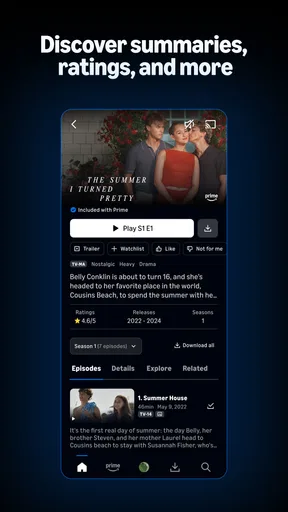

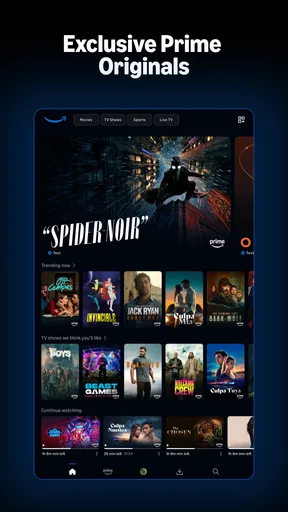
Our Review of Prime Video
 Analysis by Appyee
For a household that shares a tablet or TV, a streaming app is more than a shelf of shows: it becomes part of the evening routine. I find Prime Video most useful when everyone can agree on something quickly, but shared use also makes it worth thinking about who is choosing, what they are watching, and whether the app fits the way your home handles accounts and devices.
When one screen serves several people
A realistic use case is a family settling in after dinner: one person wants a film, another would rather continue a series, and someone else is only browsing. The broad mix of movies, television, live programming, and sports gives the group different kinds of viewing to consider, rather than making the app feel aimed at just one mood. That variety is helpful, though it does not guarantee that everyone will find a title they want at the same time.
I’d treat the shared screen as a place to make a choice together, not assume that one person’s recommendations will suit the entire household. A practical habit is to search for a specific title or genre when you already have an idea, instead of letting a long browse turn into the evening’s main activity. If the group is undecided, agree on a couple of options before opening the app; it keeps scrolling from becoming a negotiation that lasts longer than the show.
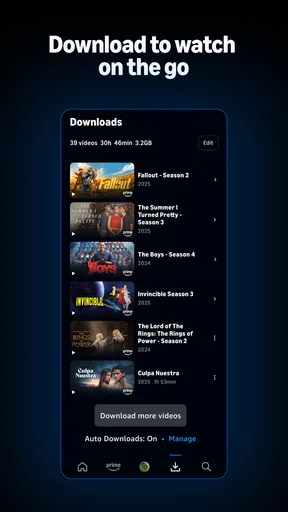
For a household with different schedules, the app is also useful when one person watches at home and another wants to save something for a journey. Offline viewing can help with that split, but it works best when you plan ahead: choose what you want while connected and allow time to download it before leaving. I would not rely on an offline copy as a last-second fix when you are already heading out.
Setting expectations around accounts and devices
Before making this the default app on a shared device, I’d decide whose account is being used and who is allowed to make viewing choices on it. That simple conversation can prevent confusion later, especially when several people browse on the same screen. I would not treat a shared login as a substitute for clear household boundaries; people may have different tastes, and a child’s idea of a suitable choice can differ from an adult’s.
The app is free to download, but that does not mean every possible viewing choice has no cost attached. Prime Video includes in-app purchases, so I’d make sure everyone using a shared device understands that selections can involve spending. If you prefer to avoid surprises, keep purchases and viewing decisions in the hands of the person responsible for the account rather than assuming that every item in the app is part of one included bundle.
On a personal phone or tablet, the decision is simpler: you can browse at your own pace and use downloads for planned trips. On a device passed around the living room, it is better to agree on a routine for signing in, choosing content, and handing the screen back. I find that kind of small bit of coordination more valuable than expecting the app itself to settle household disagreements.
Age, trust, and choosing what to watch
The app carries a Teen content rating, which is useful context but not a substitute for a parent or guardian deciding what is appropriate for a particular young viewer. I would use that rating as a prompt to pay attention, especially in a home where children and adults share one screen. A title that looks suitable from its artwork or category may still deserve a closer look before everyone presses play.
One helpful viewing habit is to pause before starting a new series or film and check whether it suits the people in the room. X-Ray can surface cast details and trivia while something is playing, but I see that as a companion for curious viewers rather than a screening tool for parents. Subtitles and audio choices can make a session more comfortable for people with different preferences, though they do not resolve the bigger question of whether the content itself is right for the audience.
Prime Video is a better fit for households willing to make those choices together than for anyone expecting a streaming app to manage family decisions on their behalf. If you need a service whose main appeal is a carefully controlled children’s experience, I would compare options specifically for that need before settling on this one. Here, the useful approach is to keep an adult involved in selection and to make the boundaries clear on a device everyone can access.
First Impressions and User Interface
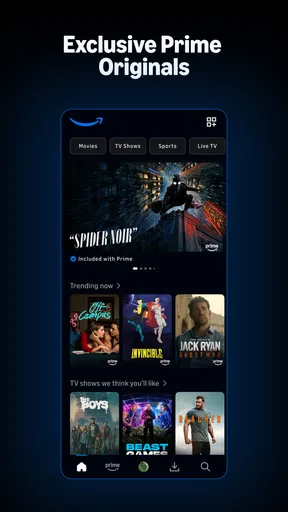
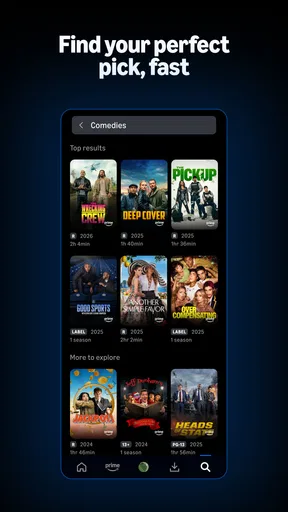
First things first, the download and installation were a breeze. Once I opened the app, I was greeted by a pretty clean and intuitive interface. Everything is well-organized, with categories like TV shows, movies, and originals right at your fingertips. I also noticed a handy search bar at the top, which makes finding specific titles a piece of cake.
One thing that struck me was how smooth the navigation is. Switching between genres or scrolling through endless lists of binge-worthy content feels seamless. The thumbnails are crisp, and the app’s layout doesn’t feel cluttered, which is a big win in my book.
Content Galore
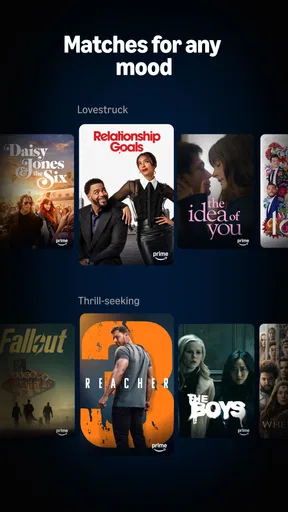
Now, let’s talk content because, honestly, that’s what we’re all here for! Prime Video boasts an impressive library of movies, TV shows, and exclusive originals. From the latest blockbusters to classic films, there’s something for everyone. I was pleasantly surprised to find some hidden gems and international content that I hadn’t seen on other platforms.
The originals are where it really shines. Shows like "The Marvelous Mrs. Maisel" and "The Boys" have been on my watchlist forever, and they did not disappoint. With a mix of drama, comedy, and action-packed series, it’s hard to run out of things to watch. Plus, new content is added regularly, keeping things fresh and exciting.
Features That Stand Out
One of the features I found super useful is the X-Ray feature, which gives you trivia, cast info, and more about what you’re watching. It’s like having IMDb at your fingertips without leaving the app. The ability to download content for offline viewing is also a game-changer, especially for those long commutes or flights.
Prime Video also offers customizable subtitles and audio options, which is great for accessibility and catering to different preferences. And for those who love to multitask, the picture-in-picture mode lets you watch while doing other things on your device.
Final Thoughts
All in all, Prime Video is a solid streaming service that offers plenty of bang for your buck. With its extensive library and user-friendly interface, it’s hard not to get hooked. Whether you’re a movie buff, a TV series fanatic, or just looking for some quality entertainment, this app has got you covered. So go ahead, give it a whirl, and happy streaming!
How it fits among other streaming apps
As an entertainment app from Amazon Mobile LLC, Prime Video sits in the same broad space as other on-demand video services, but I would compare it by viewing habits rather than by assuming every service has the same catalogue or deal structure. If you mainly want a particular show that belongs to another service, that other app may be the more direct choice. If you like switching between films, series, live programming, and sports in one place, this one has a more flexible role in a viewing routine.
Its free download makes it easy to try, while the in-app purchase range—from a few cents to several hundred dollars per item—means I would pay attention to what a particular selection involves before confirming it. The practical distinction is between installing the app and deciding what to watch or buy inside it. I would not choose it on the assumption that every title is included at no extra cost.
For someone who watches only occasionally, a broad catalogue can be less important than finding one specific film quickly. Search helps in that situation, but if you already know the title is exclusive to another service, opening that service first may save time. For a regular viewer who likes sampling different kinds of programming, Prime Video is easier to justify as a general-purpose option, especially when the household already has a shared routine for choosing and paying for content.
Small habits that make browsing easier
One non-obvious way I use the app is to search before settling into a long browse. On a phone, it is tempting to swipe through rows of recommendations, but a direct search is more useful when you have a clear target. If you are choosing for several people, search for two or three possible titles and compare them together rather than letting the first thumbnail decide the night.
I also treat X-Ray as something to consult selectively. It can be fun to check a cast member or a piece of trivia during a show, particularly when watching with someone who likes to identify actors, but looking things up while a scene is unfolding can interrupt the mood. For a first viewing, I would leave it alone until a natural pause; for a rewatch, it can add context without turning the session into a separate research task.
Subtitles and audio settings are worth checking before the opening scene, not halfway through. That is especially helpful when the room is noisy, viewers prefer different language options, or someone needs text to follow the dialogue. Since preferences can vary from one person to another, I would check the chosen settings each time the device changes hands rather than assume the last viewer left things as everyone wants them.
Downloads are best treated as preparation, not a promise that every viewing situation will work exactly as it does at home. I’d pick the content in advance and confirm it is ready before a commute or flight. This is a useful trade-off: offline access can make a planned trip less dependent on a connection, but it requires a little organization and does not replace the convenience of browsing freely when you are back online.
Who will enjoy it, and who may prefer something else
I think the app suits people who want a mix of familiar series, films, and other programming, and who are comfortable deciding title by title what is worth watching. Its average rating is 4.0 from around five million ratings, and it has passed 500 million installs, so it is clearly a familiar option for a large audience. Those figures tell me it has broad reach, but they cannot tell you whether its current selection matches your own taste.
It is less compelling if you want one narrow kind of content and already know another service does that job better for you. It may also frustrate anyone who expects browsing to reveal only titles they can watch without further choices, since purchases can be part of the experience. I would skip it as a household’s sole answer if no one is willing to coordinate account use, keep an eye on spending, or take responsibility for age-appropriate selections.
For a busy weeknight, I can picture opening it after dinner, searching for a film the household has already agreed on, checking the audio and subtitle settings, and starting without spending half an hour browsing. On a different day, I might use it alone, save a title for offline viewing before travelling, and explore X-Ray after the episode rather than interrupting it. Those are two distinct strengths: shared choice can make it an easy living-room option, while downloads and viewing details give solo sessions a little more flexibility.
A grounded household verdict
Prime Video is free to install, is rated for Teen audiences, and comes from Amazon Mobile LLC. It was released on August 28, 2017, and the app has a 4.0 average rating alongside a large audience. I would take the age rating seriously as a starting point, not as permission to leave younger viewers to choose without oversight. In a shared home, clear account and purchase boundaries matter just as much as the range of entertainment.
My main reservation is that a large selection can create a feeling of choice without making the decision itself easier. Search, X-Ray, downloads, and playback options help in specific situations, but they do not remove the need to check what a title costs, whether it suits everyone watching, or whether the people sharing a device have agreed on how to use it. That is a manageable amount of friction for viewers who like variety; it is a poor fit for anyone seeking a completely hands-off household setup.
Overall, I’d recommend giving it a try if you want a flexible entertainment app and are happy to make deliberate choices about viewing. I would be more cautious if your priority is a tightly supervised children’s experience, a single guaranteed catalogue, or a setup where nobody has to think about purchases. Used with sensible boundaries, it can serve both a shared evening and an individual commute; the best experience comes from knowing which of those jobs you want it to do.
Privacy and Permissions
See what permissions an app requests and how it handles your data.
- Identity
- find accounts on the device, add or remove accounts
- Contacts
- find accounts on the device
- Location
- approximate location (network-based), precise location (GPS and network-based)
- Phone
- read phone status and identity
- Photos/Media/Files
- read the contents of your USB storage, modify or delete the contents of your USB storage
- Storage
- read the contents of your USB storage, modify or delete the contents of your USB storage
- Microphone
- record audio
- Wi-Fi connection information
- view Wi-Fi connections
- Device ID & call information
- read phone status and identity
- Other
- view network connections, create accounts and set passwords, pair with Bluetooth devices, change network connectivity, allow Wi-Fi Multicast reception, full network access, run at startup, use accounts on the device, control vibration, prevent device from sleeping
How Prime Video Compares
Full ComparisonNetflix suits viewers who want a broad, frequently refreshed library, Prime Video appeals to value seekers who want films, series and live programming, and Disney+ is the focused pick for Disney, Star
| App | Developer | Rating | Price |
|---|---|---|---|
 Netflix | Netflix, Inc. | 4.8 | Free |
 Prime VideoThis App | Amazon Mobile LLC | 4.7 | Free |
 Disney+ | Disney | 4.4 | Free |
Verdict
Strengths of Prime Video
- Extensive library of movies and series.
- Offline viewing available for downloads.
- Affordable subscription options.
- Multiple user profiles per account.
- Integration with Alexa for voice control.
Limitations of Prime Video
- Interface can be a bit cluttered.
- Not all content available in 4K.
- Ads for Amazon products within app.
- Limited parental controls.
- Occasional buffering issues on streams.
Other Releases by Amazon Mobile LLC
View All
MX Player
Video Players & Editors4.2

Amazon Shopping
Shopping4.4

Prime Video
Entertainment3.1

Amazon Kindle: Reading App
Books & Reference4.8
Similar Picks in This Category
View All
Google Play Games
Google LLC3.9

Netflix
Netflix, Inc.4.8

YouTube Kids
Google LLC4.2

Disney+
Disney4.4

Steam
Valve Corporation3.2

PlayStation App
PlayStation Mobile Inc.3.5
You May Also Like
View All


Frequently Asked Questions
What devices are compatible with Prime Video?
Prime Video is available on a wide range of devices, including smartphones, tablets, smart TVs, gaming consoles, and web browsers. It supports both Android and iOS platforms, and you can also stream content on devices like Amazon Fire TV, Roku, and Apple TV. Make sure your device is updated to the latest software version for optimal performance.
How much does a Prime Video subscription cost?
Prime Video is included with an Amazon Prime membership, which costs $14.99 per month or $139 annually in the United States. If you prefer, you can subscribe to Prime Video as a standalone service for $8.99 per month. Prices may vary by country, so check the website for local pricing.
Can I download content for offline viewing on Prime Video?
Yes, Prime Video allows you to download select movies and TV shows to watch offline. This feature is available on the Prime Video app for mobile devices and tablets. There is a limit to the number of titles you can download across devices, so managing your downloads is important to ensure you have access when offline.
Does Prime Video offer parental controls?
Prime Video provides parental controls to help manage what content is accessible to children. You can set up a PIN to restrict purchases and viewing of content based on ratings. Profiles can also be created specifically for kids, filtering content to age-appropriate shows and movies. These settings can be adjusted in the app or online.
What languages are available on Prime Video?
Prime Video offers a variety of languages for both audio and subtitles, depending on the title. You can often choose from languages like English, Spanish, French, German, and more. You can adjust language settings in the audio and subtitle options while streaming, ensuring a personalized viewing experience for multilingual users.
